Scaling Philosophy
The Bet Behind This Project
The bet here is simple: AI will not stay locked inside premium proprietary boxes forever. C-Kernel-Engine takes a different path: Linux-only, CPU-only, server-grade hardware, open software, and standard data-center parts. If the software gets good enough, ordinary servers become practical AI machines.
This is a long-horizon commodity compute bet. The underlying workload is still math, memory movement, and systems software. If CPUs keep gaining cores, SIMD and matrix units, memory channels, NUMA controls, and fast interconnects, then a generated-C runtime that can orchestrate many cheap Linux nodes becomes increasingly valuable.
The asymmetry CKE is testing is that useful model intelligence does not necessarily require total model state to grow as quickly as general-purpose CPU capability and memory capacity. Dense models made parameter count the visible scaling axis. Mixture-of-experts models can increase total stored capacity while activating only part of that capacity for each token. Better data, routing, architecture, and training can also add capability without multiplying inference state at the same rate.
That matters differently for inference and training. Inference must keep the model and runtime state addressable, but it may execute only a sparse path through the weights. Large CPU memory domains can make that placement increasingly practical as cores, matrix instructions, channels, and bandwidth improve. Training is harder because gradients, optimizer state, saved activations, and communication multiply the memory and compute requirement. CKE's frontier-model bet is therefore not that training is already solved; it is that inference becomes practical first, and measured CPU training capability expands as kernels, memory systems, and distributed execution improve.
This is not a claim that CPUs always beat GPU systems on raw peak throughput. That is not the point. The real question is whether CPU-only Linux systems can become good enough, cheap enough, and accessible enough to handle serious inference and eventually serious training. That is the thesis being tested here.
The early numbers already show that CPU-only inference is practical. A quantized 0.6B model on a 12th-gen Intel Alder Lake machine has reached about 100 tokens/sec when the system is otherwise idle. On an older 4-core machine, the same model still runs at about 20–25 tokens/sec. No GPU. No CUDA. No special hardware. Just common x86 instructions and Linux.
The bigger target is server-grade CPU infrastructure. Testing is underway on 5th-gen Intel Xeon Scalable systems with AVX-512 and AMX — the same class of machines already sitting in real data centers. The bet is that these machines will be cheaper, easier to procure, easier to operate, and more broadly deployable than proprietary accelerator-heavy stacks.
The method is straightforward: profile, find the real bottleneck, fix one kernel at a time, and measure again.
C-Kernel-Engine uses VTune, FlameGraph, Intel Advisor, perf stat, and roofline analysis to do exactly that.
The point of this page is not hype. It is to state the engineering bet clearly and then earn it with measurements.
Part of one theory: this page is the why. The CKE Constraint Model states the shared math; CKU measures it; Memory Tetris places bytes; Distributed Zip parallelizes regions — and measurement closes the loop.
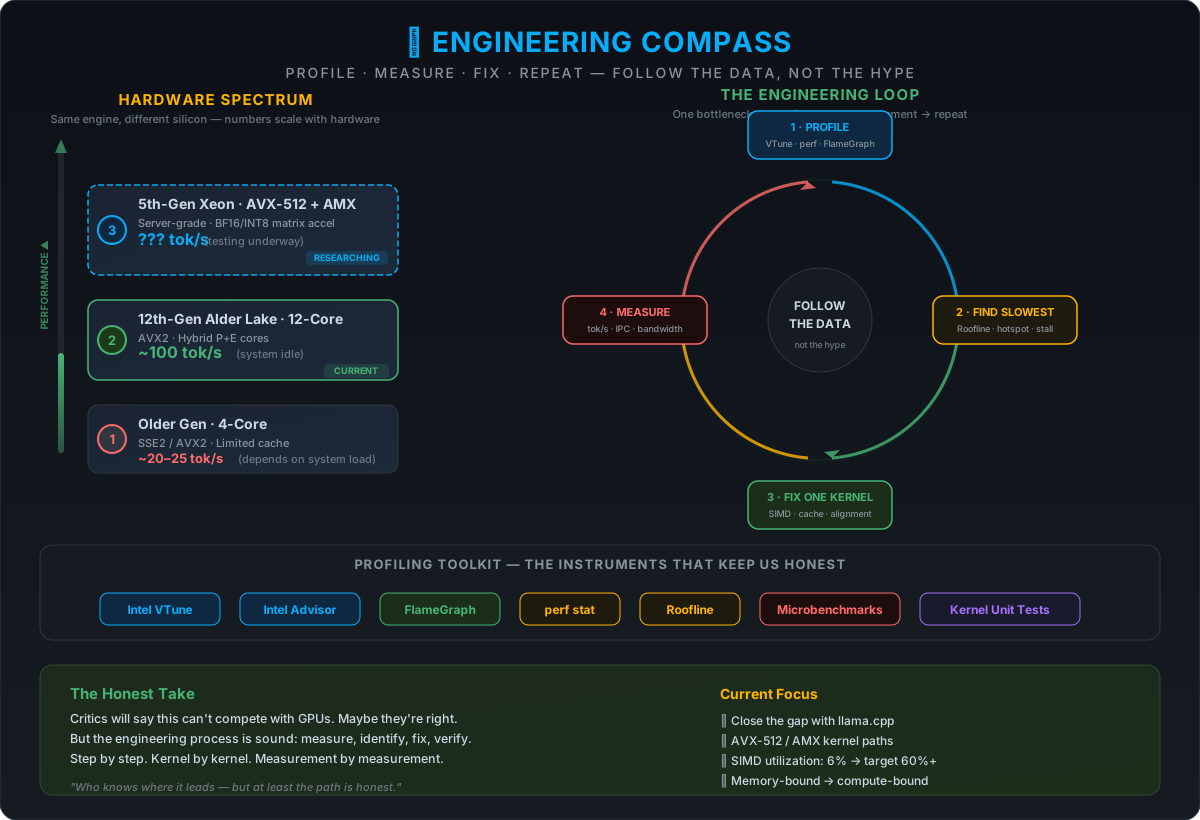
🧭 Engineering Compass — What This Page Is Really For
This page is the reminder to stay focused on the real thesis: make CPU-only Linux systems useful for modern AI by improving the software until commodity server hardware becomes practical. The scaling story is a direction, not a marketing slogan.
The engineering discipline is simple and repeatable:
- Find the slowest-moving part. Profile it. Understand why it's slow.
- Find the fastest-moving part. Understand what makes it fast. Replicate the pattern.
- Get more RAM, more cores. Test on bigger hardware. See if the architecture holds.
- Keep profiling. VTune, perf stat, roofline, FlameGraph — every run, every change.
- Fix one kernel at a time. Don't boil the ocean. One bottleneck, one fix, one measurement.
People will disagree with the thesis, and that is fine. The only useful answer is better measurement, better kernels, and clearer system design. Follow the data, not the hype.
1) 0 × ∞ = 0: If the model doesn't fit in memory, FLOPS don't matter.
2) Theory of Constraints: At the Ethernet boundary, CPUs and GPUs face the same bottleneck.
The Two First Principles
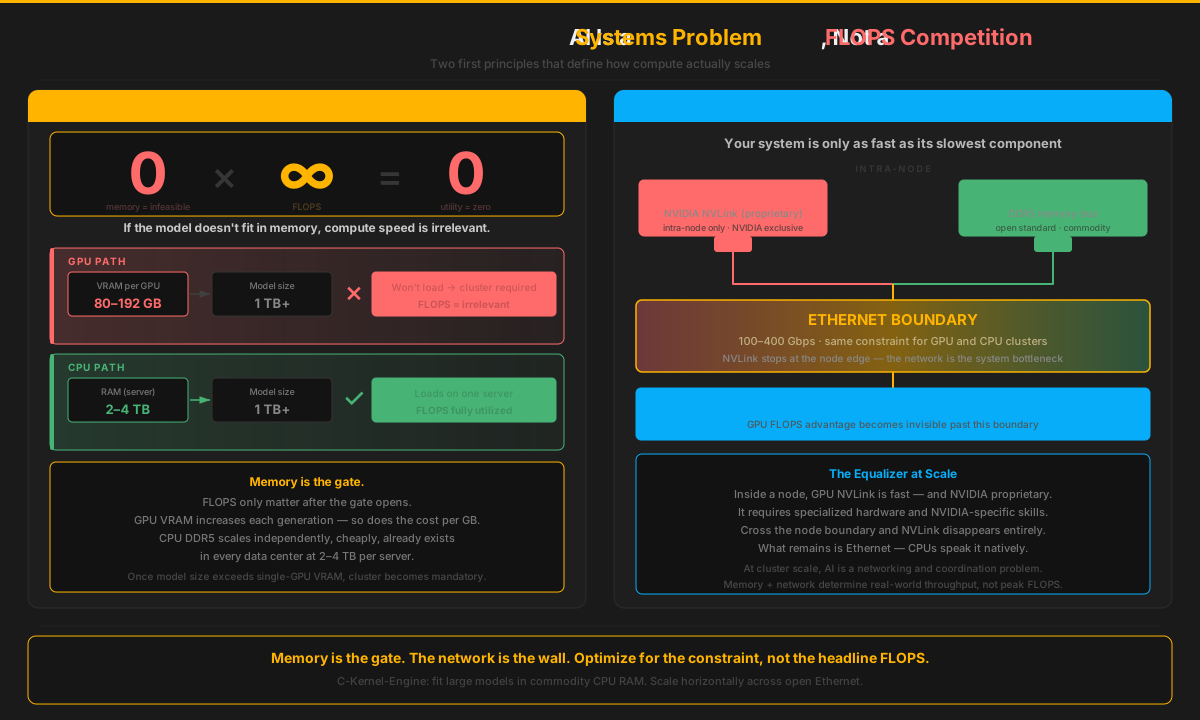
Adding CPU servers still requires sharding, scheduling, networking, and NUMA discipline. But it avoids vendor-specific programming models, specialized accelerator fabrics, and the assumption that serious AI must depend on external accelerators from the start. The bet here is that standard Linux servers on Ethernet remain a simpler operational path for many real deployments.
The Computation Is Not Exotic
AI training and inference reduce to five operations: matrix multiply, attention, softmax, layer normalization, and backpropagation. These are linear algebra and calculus — mathematics developed in the 17th through 19th centuries, long before the first computer. Nothing about the computation requires physically exotic hardware. A CPU with SIMD instructions executes every one of these operations natively. If the math isn't exotic, the hardware requirement isn't permanent — it's a market condition. And market conditions change.

In 1995, "You can't run serious workloads on cheap PCs" was conventional wisdom.
In 2025, "You can't run serious AI on cheap CPUs" is conventional wisdom.
One of these beliefs aged very poorly. The pattern suggests which way this one goes.
Historical reference
| Era | Proprietary Incumbent | Commodity Disruptor | Result |
|---|---|---|---|
| 1990s | SPARC, Alpha, PA-RISC | x86 commodity chips | Proprietary RISC faded |
| 1998 | Sun/SGI servers ($500K+) | x86 PCs + MapReduce/GFS | Sun bankrupt (2010) |
| 2009 | Teradata, Netezza ($1M+) | Hadoop on commodity clusters | Big data democratized |
| Now | GPU clusters ($M+) | CPU clusters + software | → ? |
The Google Precedent: Treat the Fleet as the Computer
Google's early advantage was not a processor that was individually faster than every high-end server CPU. It combined commodity-class machines with fault-tolerant software and optimized the fleet for throughput, price-performance, energy, and service availability. Google's cluster architecture explicitly treated peak processor performance as less important than the price-performance of the complete system.
MapReduce then made partitioning, scheduling, data locality, inter-machine communication, and failure recovery part of the runtime contract. The decisive asset was the software that kept broadly available hardware doing useful work, not a benchmark showing that one commodity core was faster than a proprietary server core.
That is the precedent CKE follows for AI. The goal is to make circuits, kernels, memory placement, NUMA, communication, and recovery explicit enough that a CPU fleet approaches its useful hardware envelope. If server CPUs continue to add cores, matrix instructions, memory channels, capacity, and bandwidth while frontier-model state grows more slowly, incremental hardware progress compounds into support for more models, longer contexts, and larger active workloads.
Sources: Google cluster architecture, MapReduce, and warehouse-scale power provisioning.
Principle 1: The Cost of 0 × ∞ = 0
The GPU Memory Trap
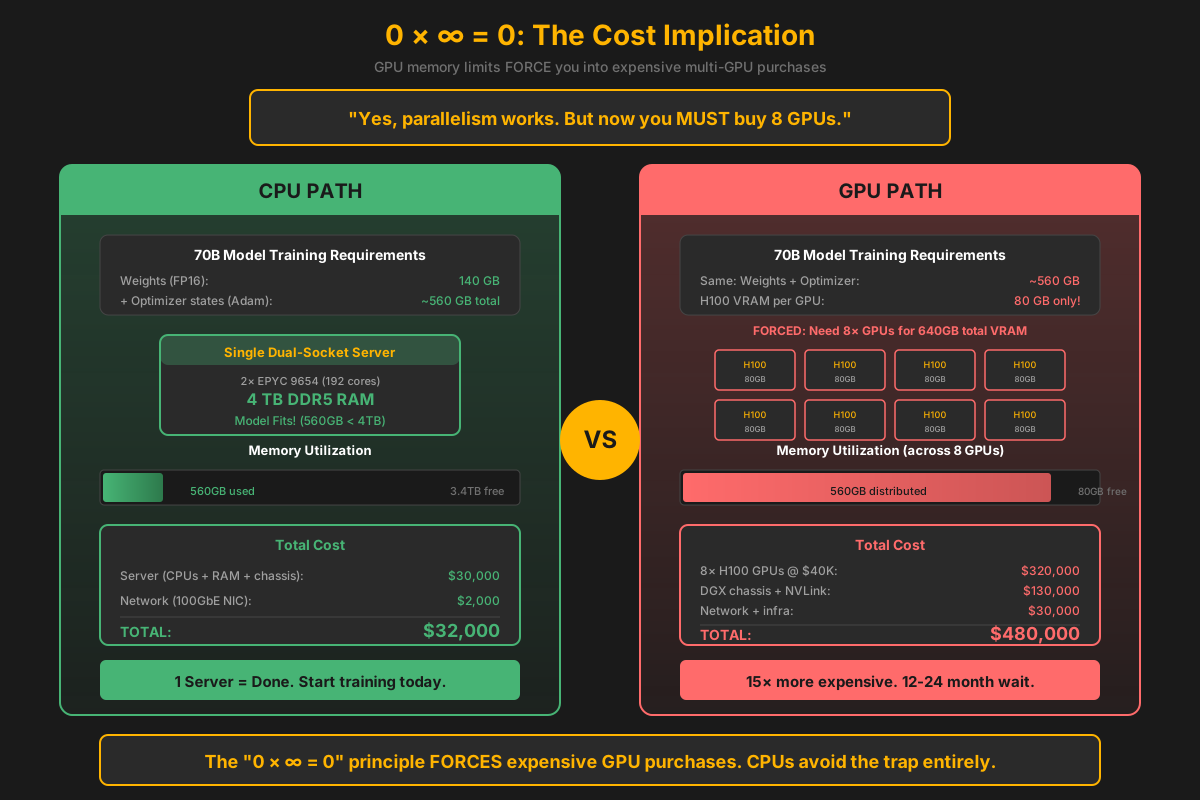
Yes, you CAN fit a 70B model on GPUs using tensor/pipeline parallelism. That's not the point.
The point is: you're now FORCED to buy 8+ GPUs in a cluster.
And GPUs are:
- Proprietary — locked to NVIDIA (CUDA), no open ecosystem
- Export-controlled — leading data-center accelerators may be restricted by destination and product class
- Cluster-required — single GPUs can't handle large models, need NVLink infrastructure
- Expensive — $40K+ per GPU, $200K+ for NVLink switches
The Math That Matters
GPU Path:
  Model doesn't fit in 80GB → Buy 8 GPUs → $320K for GPUs alone
  Need NVLink for fast communication → Another $50K+
  Need DGX chassis → Another $80K+
  Total: $450K+ just to START

CPU Path:
  Model fits in 4TB RAM → Buy 1-2 servers → $30K each
  Standard Ethernet networking → $2K
  Total: $60K and you're running
The "0 × ∞ = 0" principle forces GPU users into expensive multi-GPU setups. CPUs avoid this entirely.
Target Platform
Server-Grade Hardware by Instruction Set
C-Kernel-Engine uses ck_features.h for feature detection. We target by SIMD capability, not CPU model:
Instruction Set Priority
- AMX - 512-bit tile ops (Intel Sapphire Rapids+)
- AVX-512 - 512-bit vector (Intel Skylake-X+, AMD Zen 4)
- AVX2+FMA - 256-bit with FMA (Intel Haswell+, AMD Zen 2+)
- AVX - 256-bit vector (Intel Sandy Bridge+, AMD Zen 1)
- NEON - 128-bit (ARM64, Apple Silicon)
Auto-detection: The engine selects the best kernel at build time with runtime dispatch for optional extensions.
CPU Requirements
- High core count - 64-128+ cores per socket
- Large L3 cache - Good core-to-cache ratio (1-2MB/core)
- Vector width - 256-bit minimum (AVX)
- FMA - Recommended for 2x throughput
- Multiple sockets - NUMA-aware memory access
Memory Requirements
- DDR5 - Higher bandwidth, lower latency
- Multi-channel - 8-12 channels per socket
- Large capacity - 512GB - 2TB+ per node
- ECC - Error correction for reliability
- NUMA-local - Pin threads to local memory
Accelerators
- Intel DSA - Data Streaming Accelerator for memory copies
- Intel IAA - Analytics Accelerator for compression
- Intel QAT - QuickAssist for crypto (if needed)
- CXL - Memory expansion and pooling (future)
Networking
- RDMA - InfiniBand or RoCEv2
- 100-400 Gbps - High bandwidth interconnect
- Low latency - 1-2 μs for RDMA operations
- Kernel bypass - Zero-copy transfers
Operating System
Linux-only. We use Linux-specific features:
mmap()withMAP_HUGETLBfor huge pagesmadvise(MADV_HUGEPAGE)for transparent huge pagesnumactl/set_mempolicy()for NUMA bindingsched_setaffinity()for core pinningperffor profilingio_uringfor async I/O (weight loading)- Intel DSA via
libaccel-config/idxddriver
C-Kernel-Engine targets by instruction set capability, not CPU model. Any server-grade CPU with AVX2+FMA or better is a valid target — specific models change, the instruction sets don't. See include/ck_features.h for detection logic.
Why CPU-Only?
GPUs dominate when you can keep them highly utilized. Large batches, dense GEMMs, and well-packed workloads that fit comfortably in VRAM let GPUs exercise their theoretical FLOPS advantage. C-Kernel-Engine isn't anti-GPU—we're anti-waste: wasted money on unused capacity, wasted energy at low utilization, and wasted coordination overhead at scale.
Advantages
- No vendor lock-in - Works on any x86/ARM CPU
- Commodity hardware - Standard servers, not $40K GPUs
- Larger memory - 2TB RAM per node, no 80GB VRAM limit
- Better debugging - GDB, Valgrind, perf all work
- Simpler deployment - No CUDA, no driver hell
- Open ecosystem - GCC, Linux, standard tools
The Trade-off
- GPUs have higher peak FLOPS
- But: memory bandwidth often bottlenecks anyway
- But: PCIe transfer overhead for large models
- But: multi-GPU coordination is complex
- But: CPU memory is 10-100x larger and cheaper
For inference: CPUs are often faster for batch=1
For training: Scale horizontally with RDMA
The Fundamental Math: 0 × ∞ = 0
It doesn't matter how fast your compute is if your model won't fit in memory. Being 10x faster at computing doesn't help if you're limited by 0 × ∞ = 0.
CPU: Memory Wins
- Dual-socket server: 4-6TB DDR5
- Can train: 1TB model in BF16
- Math: 4-6TB × dual socket = non-zero, model loads
- Result: Actually trains the model
GPU: Compute Fast, Memory Fails
- Single GPU VRAM: tops out well below what large models need
- Each GPU generation: more HBM — at exponentially higher price per unit
- The constraint: 1TB model ÷ per-GPU VRAM = many GPUs, minimum, just for weights
- Math: 0 utility per GPU (model won't fit alone) × fast FLOPS = 0 — compute speed doesn't solve a memory problem
- Result: You buy more GPUs. Cost compounds. Complexity compounds. Memory is still the bottleneck.
The GPU Cluster Reality
GPUs Require Clusters
Here's the fundamental problem: no single GPU can handle large models. You need a cluster.
- Per-device memory remains finite: frontier models and long contexts can still require model and state sharding
- Multi-GPU needed: 8-32 GPUs for practical workloads
- NVLink required: $200K+ in interconnects for fast GPU-to-GPU communication
- DGX systems: Pre-configured clusters start at $250K+
Every accelerator has a finite local-memory boundary. As models and context state grow beyond that boundary, execution requires coordinated sharding across devices or nodes. The CPU-cluster thesis is that large, addressable system memory and standard Linux distribution can provide another path through that constraint.
Energy Efficiency: The CPU Advantage at Realistic Utilization
This is the final argument GPU advocates use. But the math changes dramatically when we look at realistic utilization, not theoretical peak FLOPS.
The Utilization Problem
GPU efficiency claims assume 100% compute utilization. Real inference doesn't work that way:
- Batch=1 latency: Most production inference is single-request
- Memory-bound: KV cache and weight loading dominate
- Token-to-token: 90%+ of time is waiting for next token
- I/O bound: Network, disk, and tokenization overhead
The dirty secret: GPUs spend most of their time idle, still drawing full power.
The Idle Power Reality
GPU: Always Hungry
- High-end GPU at idle: ~150W (just sitting there)
- High-end GPU at compute: ~700W
- PCIe overhead: +50W for data transfer
- VRAM stays powered: Weights must remain loaded
Real-world: If your GPU is only computing 20% of the time, you're wasting 80% of that 700W.
CPU: Scales Down
- Dual Xeon at idle: ~100-150W (bare OS, minimal load)
- Dual Xeon at compute: ~800-1000W (full load)
- DVFS: Scales from 0.8GHz to 3.5GHz dynamically
- C-states: Deep sleep cores when waiting for I/O
Real-world: Enterprise server with 2TB RAM typically draws 200-400W average for inference workloads.
Power-Per-Token Analysis
| Scenario | GPU Power | CPU Power | Winner |
|---|---|---|---|
| Theoretical peak FLOPS | 700W / 989 TFLOPS = 0.71 W/TFLOPS | 1000W / 6 TFLOPS = 167 W/TFLOPS | GPU (theoretical) |
| Memory-bound (typical inference) | 700W (can't scale down) | 200-400W (scales with load) | CPU (2-3.5x less) |
| Batch=1, high I/O wait | 300W average (60% idle) | 150-200W average (70% idle) | CPU (1.5-2x less) |
| Multi-tenant (6 models) | 6 × 700W = 4,200W (all active) | 800-1000W (all on one server) | CPU (4-5x less) |
The Utilization Math
GPU Cluster (6× high-end GPUs) for 6-department enterprise:
  6 departments × 1 GPU each = 4,200W continuous
  Even when only 1-2 departments are active.
  Plus: $240,000+ in hardware, NVLink complexity.

CPU (1× Dual Xeon Platinum) for 6-department enterprise:
  All 6 models resident in 2TB RAM = ~1000W max
  Each department waits its turn = efficient time-sharing
  Scales power with actual compute load (not fixed at max)

Net difference: 4-5x less power, 10x lower hardware cost
Watts Per Token: The Real Numbers
Enterprise Deployment Comparison
Scenario: 6 models, 24/7 operation, mixed workload

GPU Cluster (6× high-end GPUs):
  Idle power: 6 × 150W = 900W
  Compute power: 6 × 700W = 4,200W (when all busy)
  Average (typical 20% compute): ~1,500W
  Power/24hr: 36 kWh
  Power/year: 13,140 kWh
  @ $0.10/kWh: $1,314/year

CPU Server (1× Dual Xeon Platinum, 2TB RAM):
  Idle power: ~150W (bare OS, all models in RAM)
  Compute power: ~1000W (all models active)
  Average (typical 20% compute): ~320W
  Power/24hr: 7.7 kWh
  Power/year: 2,800 kWh
  @ $0.10/kWh: $280/year

Net difference: 4-5x less power = ~$1,000+/year savings
Carbon Footprint: Real-World Impact
CPU Advantage
- 4-5x less electricity for multi-tenant inference
- No GPU manufacturing impact (TSMC 4nm vs 5nm)
- Lower cooling due to lower heat output
- Uses existing infrastructure - no new hardware needed
- 10x lower hardware cost ($60K vs $600K+)
When GPUs Make Sense
- Training large models (100B+) at 100% utilization
- Very high throughput with batching
- Research where peak FLOPS matter more than efficiency
GPU efficiency claims assume 100% compute utilization. Real inference workloads are typically 10-30% compute-bound. At realistic utilization, CPUs consume 3-5x less power for multi-tenant inference. Plus: 10x lower hardware cost. This isn't theory - it's simple thermodynamics based on how often your hardware is actually doing work.
The Hidden Cost: Power Delivery and Signal Integrity
GPU marketing quotes peak TFLOPS. What they don't mention is the electrical engineering nightmare required to actually deliver those peaks.
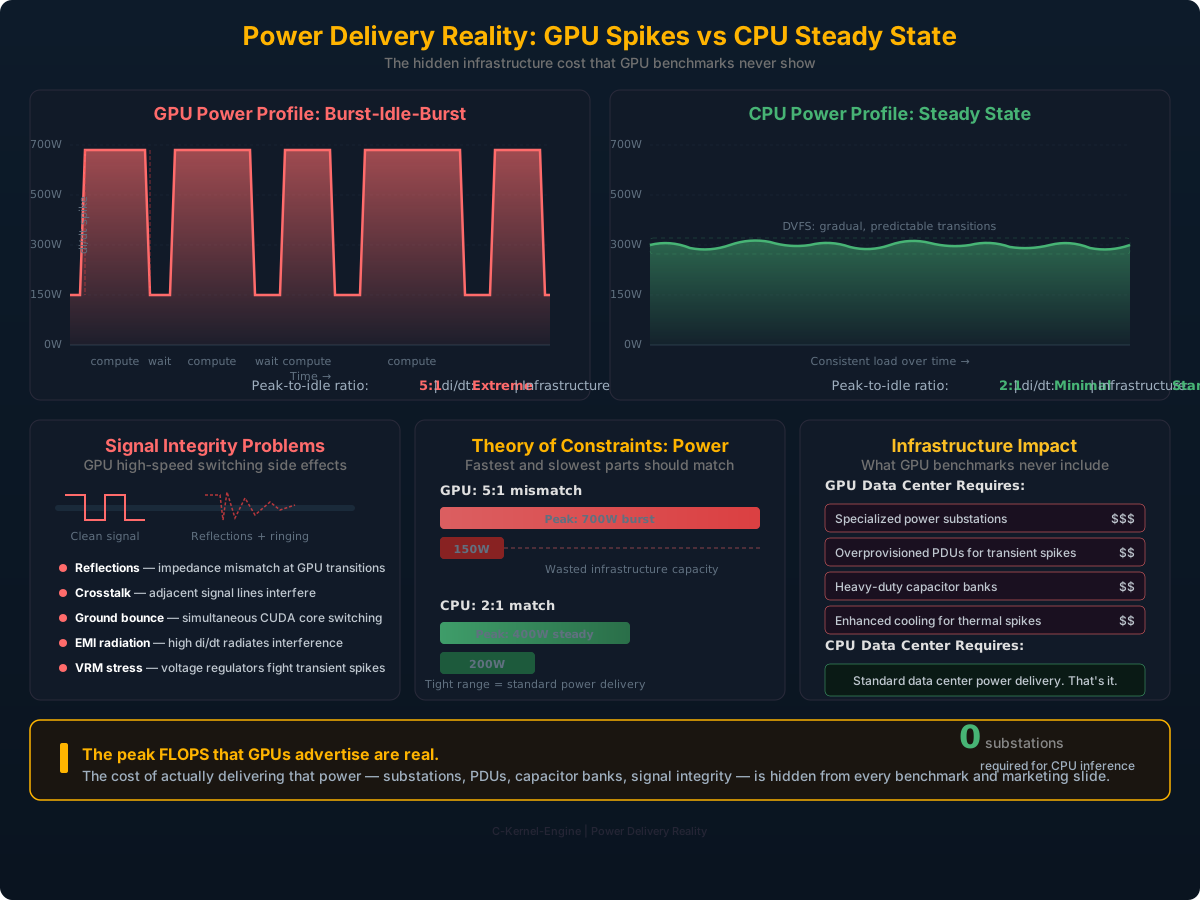
The GPU Power Profile: Burst-Idle-Burst
GPUs don't draw steady power. They spike to peak compute (hundreds of watts), then drop when waiting for data transfer, then spike again. This burst-idle-burst pattern creates massive di/dt (rate of current change) that cascades into real electrical engineering problems:
- di/dt spikes — Rapid current transitions from idle to peak compute stress every component in the power delivery path
- Signal reflections — High-speed switching creates signal integrity issues on PCB traces and interconnects
- Crosstalk — Adjacent high-speed signal lines interfere with each other at GPU clock speeds
- Ground bounce — Simultaneous switching of thousands of CUDA cores causes ground plane voltage fluctuation
- Power supply design — PSUs must handle massive transient spikes, requiring expensive voltage regulation and capacitor banks
Result: Data centers running GPU clusters need specialized power infrastructure — substations, high-capacity PDUs, and overprovisioned power delivery — to handle these peak bursts that occur for fractions of a second.
GPU: Spiky, Unpredictable Power
Power draw over time:
  ████████░░░░████████░░████████░░░░
  700W     150W  700W  150W 700W  150W
  compute  wait  compute wait compute wait

Peak-to-idle ratio: ~5:1
di/dt: Extreme
Infrastructure: Substation-grade power delivery
CPU: Steady, Predictable Power
Power draw over time:
  ████████████████████████████████
  200-400W consistent draw

Peak-to-idle ratio: ~2:1
di/dt: Minimal (DVFS transitions are gradual)
Infrastructure: Standard data center power
Theory of Constraints Applied to Power
The fastest moving part and the slowest moving part of a system should be as close together as possible. GPUs violate this principle at the electrical level:
- Fastest part: GPU peak compute at 700W+ burst
- Slowest part: Data transfer at 150W idle
- Gap: 5:1 ratio — massive mismatch that the power infrastructure must absorb
CPUs don't have GPU-level peak FLOPS, but they also don't need substation-grade power infrastructure to handle those peaks. The power draw is consistent and predictable. Standard, well-designed data center power delivery handles it without complication. No specialized substations. No overprovisioned PDUs. No capacitor banks for transient spikes.
The peak FLOPS that GPUs advertise are real — but the cost of actually delivering that power is hidden from every benchmark and every marketing slide.
Principle 2: The Ethernet Equalizer
NVLink bandwidth and domain size vary substantially by accelerator generation and system topology. Once a workload crosses the local NVLink or NVSwitch domain, it still enters a scale-out network with a different bandwidth, latency, and synchronization contract. CPU and accelerator clusters must both account for that boundary.
The Bandwidth Reality
Separate topology classes instead of freezing the analysis to one accelerator generation:
| Connection Type | Bandwidth | Where It Applies | Scales To |
|---|---|---|---|
| Local accelerator scale-up fabric | Generation and topology dependent | Device-to-device within the configured NVLink/NVSwitch domain | Bounded by the purchased system or rack topology |
| DDR5 (12-channel) | 460 GB/s | CPU-to-RAM within 1 socket | Per socket |
| 400GbE Ethernet | 50 GB/s | Node-to-node | Infinite nodes |
| 100GbE Ethernet | 12.5 GB/s | Node-to-node | Infinite nodes |
| InfiniBand HDR | 25 GB/s | Node-to-node | Thousands of nodes |
The Theory of Constraints Applied
Accelerator Cluster at Scale:
  Local domain:    High-bandwidth scale-up fabric
  Between domains: Scale-out network (one active boundary)
  System speed:    Set by whichever boundary the schedule exposes

CPU Cluster at Scale:
  Within node:  DDR5 ~460 GB/s class
  Between nodes: Ethernet ~50 GB/s class
  System speed: NOT 50 GB/s if the network never carries the same bytes

EVERY TOPOLOGY HAS A SLOWEST ACTIVE BOUNDARY.
CKE MODELS IT EXPLICITLY.
Accelerator results depend on whether communication stays within local device memory, crosses PCIe, uses a scale-up fabric, or enters the scale-out network. CPU results likewise depend on memory channels, NUMA, and network placement. A comparison that omits these boundaries is not a system comparison.
The Compute-to-Bandwidth Chasm
Every system has a fastest thing (compute) and a slowest thing (cross-node data movement). C-Kernel-Engine's entire goal is to bring these two into sync. On CPUs, they're close enough that software can bridge the gap. On accelerator clusters, the gap at the scale-out boundary is larger — and the amount of software that closes it depends on topology, scale-up domains, and overlap. CKE's answer on either is the same: model the boundary explicitly.
On CPUs, the gap between the fastest thing the system can do (compute) and the slowest thing it must do (move data across the network) is close. Peak FLOPS and Ethernet bandwidth live in the same neighborhood. That means the remaining optimization work is pure engineering — tiling, prefetching, computation-communication overlap — real techniques that bring compute and data movement closer to sync. That's what C-Kernel-Engine is built to do.
On accelerators, peak compute sits much further from the scale-out network than on CPUs — though how much that hurts depends enormously on topology: scale-up domains, communication overlap, and model-parallel schedules all narrow the effective gap. The claim here is narrower and more honest: every topology has a slowest active boundary, and the interesting question is whether the runtime models it explicitly rather than pretending every byte crosses every roof. CKE is built around modeling that boundary on CPU-first economics.
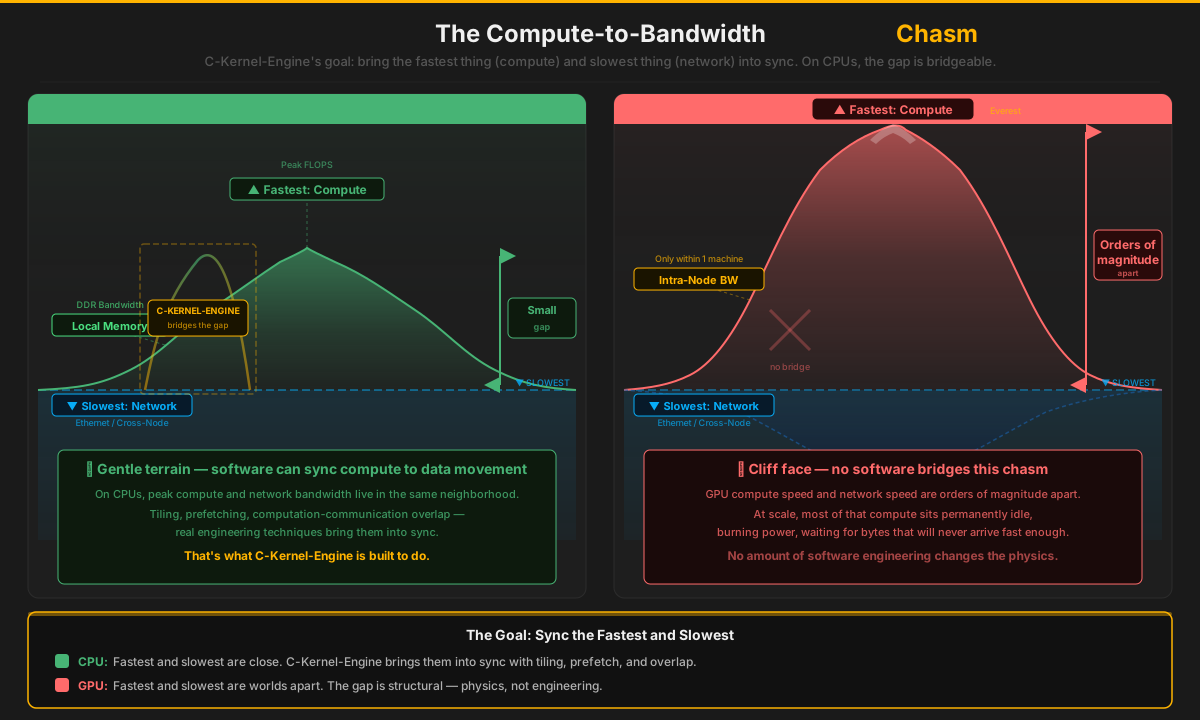
CPU: Rolling Hills — Bridgeable
- Fastest (compute) and slowest (network) are close
- Local memory bandwidth sits in between — a smooth gradient, not a cliff
- Software can bridge the remaining gap: tiling, prefetch, overlap
- Every hardware generation makes the gap smaller (more bandwidth, same physics)
The terrain is gentle enough to walk. C-Kernel-Engine's job is to build the bridge: bring compute throughput and data movement into sync through aggressive kernel engineering.
GPU: Everest to Mariana — but Topology Matters
- Fastest (compute) and slowest (scale-out network) are far apart
- Scale-up domains (NVLink/NVSwitch-class fabrics) keep part of the workload off that boundary
- Communication overlap and parallel schedules narrow the effective gap further
- The honest claim: the boundary exists on every topology — the question is whether the runtime models it explicitly
CKE's bet is not that accelerator compute sits idle — it is that CPU-first economics plus an explicit constraint model make the boundary cheap to approach. The equation is the same everywhere; only the clock speeds differ.
The goal is straightforward: bring the fastest-moving thing and the slowest-moving thing as close to sync as possible. On CPUs, they're already neighbors — the remaining work is tiling, cache management, prefetching, and overlapping computation with communication. That is a solvable engineering problem, and it's exactly what this project is built to solve. The CKE Constraint Model states the general form: every topology has a slowest active boundary, and region time is the maximum of its overlapped clocks plus the synchronization that could not be hidden — on Ryzen DDR, dual-socket NUMA, ConnectX, NVMe, HBM or NVLink alike.
Designing Your Ethernet Network
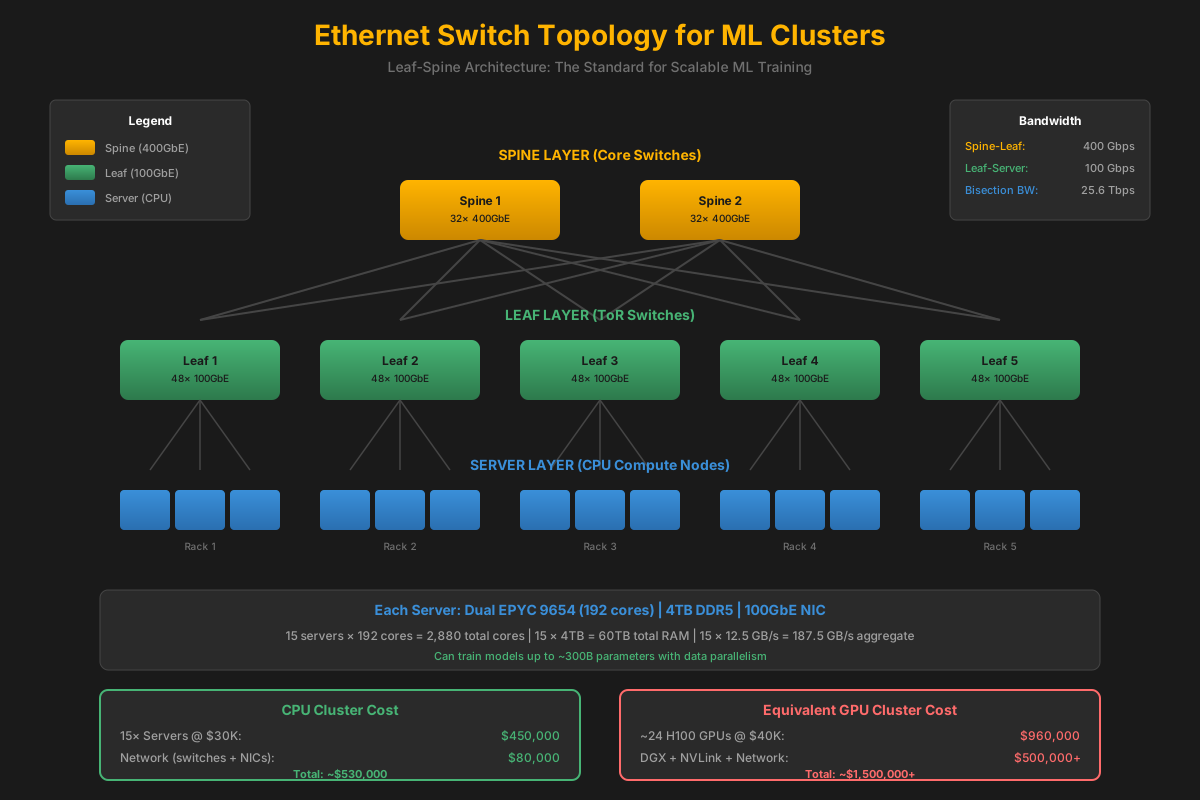
Ethernet Switch Topology for ML Clusters
Since Ethernet is the equalizer at scale, designing it well is critical.
Leaf-Spine Architecture
                    ┌─────────────┐     ┌─────────────┐
                    │  Spine 1    │     │  Spine 2    │
                    │ 400GbE      │     │ 400GbE      │
                    └──────┬──────┘     └──────┬──────┘
                           │                   │
         ┌─────────────────┼───────────────────┼─────────────────┐
         │                 │                   │                 │
    ┌────┴────┐       ┌────┴────┐       ┌────┴────┐       ┌────┴────┐
    │ Leaf 1  │       │ Leaf 2  │       │ Leaf 3  │       │ Leaf 4  │
    │ 100GbE  │       │ 100GbE  │       │ 100GbE  │       │ 100GbE  │
    └────┬────┘       └────┬────┘       └────┬────┘       └────┴────┘
         │                 │                 │                 │
    ┌────┴────┐       ┌────┴────┐       ┌────┴────┐       ┌────┴────┐
    │Server 1 │       │Server 3 │       │Server 5 │       │Server 7 │
    │Server 2 │       │Server 4 │       │Server 6 │       │Server 8 │
    └─────────┘       └─────────┘       └─────────┘       └─────────┘
Switch Sizing Calculator
Bandwidth Requirements
For distributed training with data parallelism:
  Gradient size = Model parameters × bytes per param
  70B model in FP16 = 70B × 2 bytes = 140 GB

All-reduce bandwidth needed:
  Per iteration: 2 × gradient size (reduce-scatter + all-gather)
  70B model: 2 × 140 GB = 280 GB per iteration

With 100GbE (12.5 GB/s):
  All-reduce time = 280 GB ÷ 12.5 GB/s = 22.4 seconds

With 400GbE (50 GB/s):
  All-reduce time = 280 GB ÷ 50 GB/s = 5.6 seconds
Small Cluster (8-16 servers)
- Topology: Single 400GbE switch
- Switch: Arista 7060X5 or similar
- Ports: 32× 400GbE
- Cost: ~$30,000
- Bisection BW: 12.8 Tbps
Medium Cluster (32-64 servers)
- Topology: Leaf-spine (2 spine, 4 leaf)
- Spine: 2× 400GbE switches
- Leaf: 4× 100GbE switches
- Cost: ~$120,000
- Bisection BW: 25.6 Tbps
Large Cluster (100+ servers)
- Topology: 3-tier Clos or fat-tree
- Consider: InfiniBand for lower latency
- RDMA: RoCEv2 over Ethernet or native IB
- Cost: $500K-2M depending on scale
Key insight: A GPU cluster at this scale needs the SAME network infrastructure. The Ethernet cost is equal. But CPUs don't need the $2M+ in NVLink switches.
RDMA Configuration
RoCEv2 Setup
# Enable RDMA over Converged Ethernet v2
# On each server with Mellanox/NVIDIA ConnectX NICs:

# 1. Enable PFC (Priority Flow Control) on switch
#    Required for lossless Ethernet

# 2. Configure ECN (Explicit Congestion Notification)
mlnx_qos -i eth0 --pfc 0,0,0,1,0,0,0,0  # Enable PFC on priority 3
mlnx_qos -i eth0 --trust=dscp

# 3. Set up RDMA
modprobe rdma_ucm
modprobe rdma_cm

# 4. Verify RDMA is working
ibv_devinfo
rdma link show
Scale Economics: The Real Comparison
Why CPU-Only Wins at Scale
GPU Cluster at Scale
- Capacity: Model, optimizer, activation, and context state may span many devices
- Topology: Scale-up and scale-out domains must be designed together
- Procurement: Cost and availability depend on accelerator generation and system configuration
- Result: High performance with substantial infrastructure requirements
CPU Cluster at Scale
- Capacity: Large system-memory pools reduce the number of mandatory model shards
- Topology: NUMA and network boundaries remain explicit engineering constraints
- Procurement: Standard server, memory, Linux, and network components provide a broader supply path
- Result: A credible frontier-model scaling path if CKE closes kernel and communication efficiency
The Economics Must Be Measured at Purchase Time
Accelerator prices, server prices, memory prices, power, and availability change too quickly for a permanent multiplier. The durable thesis is that CPU clusters use broadly available server components and large memory domains. CKE must prove whether those properties produce competitive frontier-model capability and total cost for a defined workload.
The Hybrid Trap: CPU+GPU = CPU-Bound
"Why not use CPU for memory and GPU for compute? Get the best of both!"
Answer: You're then AS FAST AS THE CPU anyway! You get the complexity of both with the performance of neither.
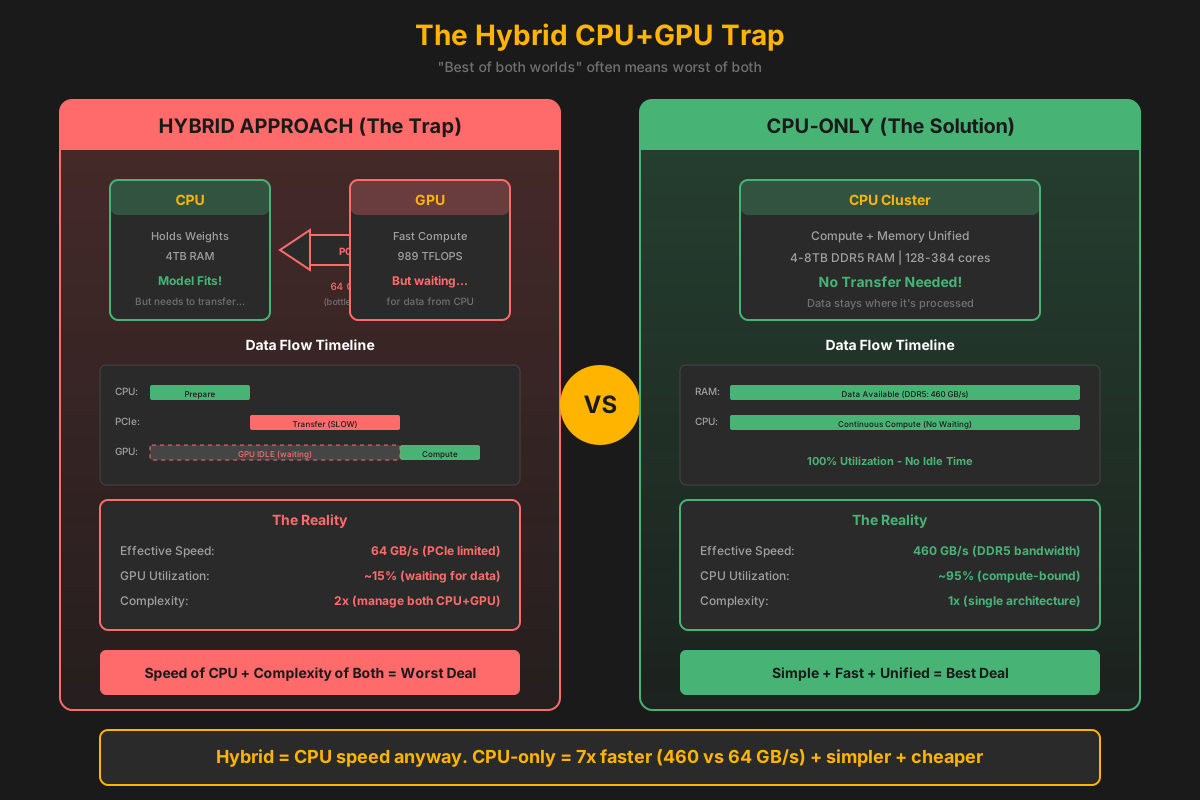
The Hybrid Bottleneck
When CPU holds weights and transfers to GPU for compute:
- Transfer bottleneck: 100 GB/s limits throughput
- GPU idle time: Waits for data from CPU
- You get: GPU performance = CPU performance
- Plus: Double the code complexity, double the cost
Conclusion: If the GPU is limited by the CPU anyway, just use CPUs! Simpler, faster, cheaper.
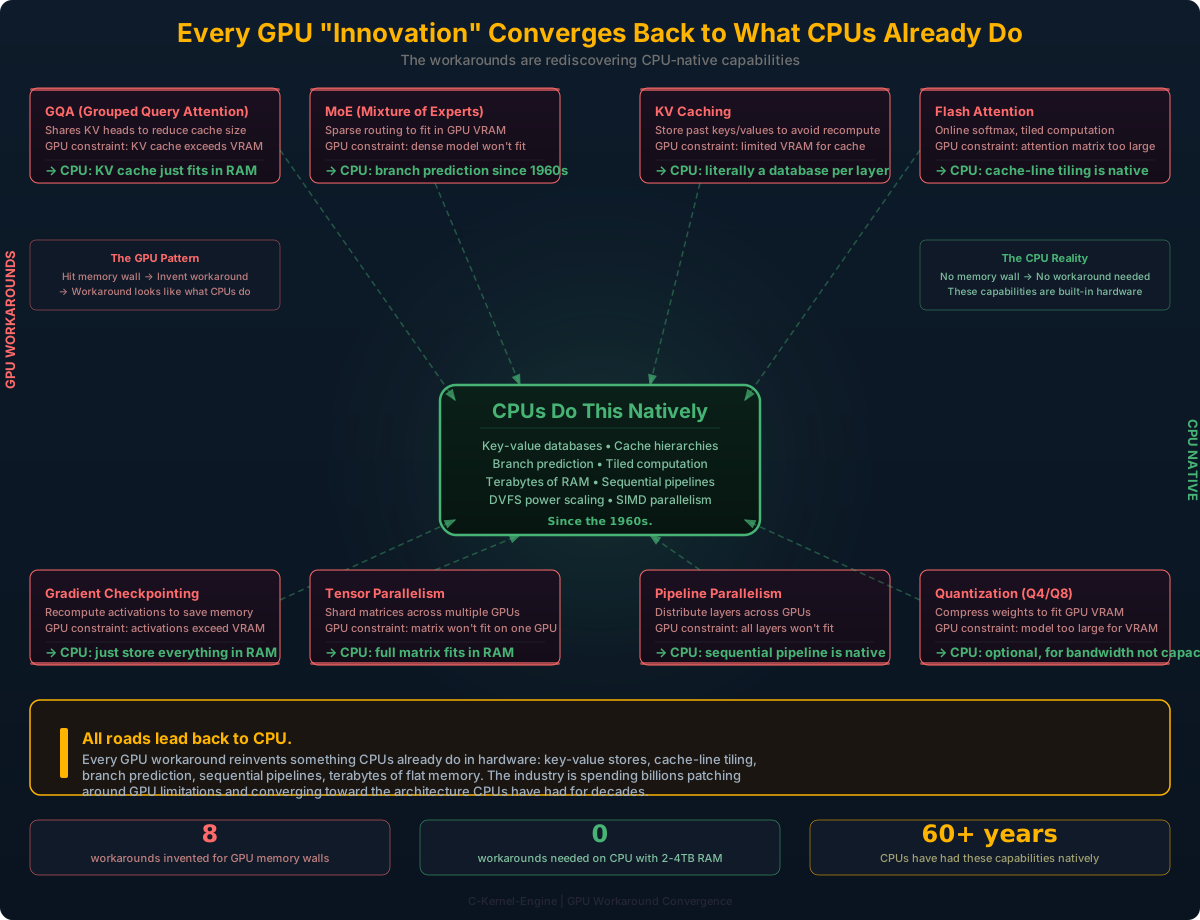
The GPU Workaround Stack: "Innovations" That Are Actually Patches
The entire field has been optimizing around a hardware constraint and mistaking the workarounds for progress. Every major "breakthrough" in LLM architecture is actually compensating for GPU memory limitations.
Every "Innovation" Maps to a GPU Constraint
| "Innovation" | What It Actually Does | The GPU Constraint It Patches | Needed on CPU with 2-4TB RAM? |
|---|---|---|---|
| GQA (Grouped Query Attention) | Shares KV heads across query heads | KV cache blows up GPU VRAM | No — KV cache fits |
| MoE (Mixture of Experts) | Activates sparse subset of parameters | Dense model won't fit on one GPU | No — dense model fits |
| KV Caching | Stores past attention keys/values — literally a key-value database in every layer | GPU VRAM limits cache size, forces eviction strategies | CPU home turf — this is literally how databases work. CPUs have been running key-value stores for decades. |
| Gradient Checkpointing | Recomputes activations instead of storing them | Training activations don't fit in GPU VRAM | No — store everything |
| Tensor Parallelism | Shards weight matrices across GPUs | Single GPU can't hold the full matrix | No — full matrix fits in RAM |
| Pipeline Parallelism | Distributes layers across GPUs | All layers don't fit on one GPU | No — all layers fit |
| Flash Attention | Online softmax with tiled computation — streams through attention in blocks | Full attention matrix doesn't fit in GPU SRAM/VRAM | Brilliant for CPU — tiling maps naturally to CPU cache hierarchies. CPUs process data in cache-line-sized tiles inherently. |
| Quantization Research | Compresses model weights (Q4, Q8, etc.) | Model doesn't fit in GPU VRAM at full precision | Optional — use for bandwidth, not capacity |
On a CPU with 2-4TB RAM, half of these become unnecessary, and the other half become simpler. The entire research direction has been shaped by GPU limitations, and people have confused "optimizations forced by GPU memory walls" with "fundamental advances in model architecture."
The Sequential Reality: GPUs Were Never Designed for This
Transformers Are Sequential. Period.
A transformer forward pass is:
Layer 1 → Layer 2 → Layer 3 → ... → Layer 80
You cannot compute layer 10 without the output of layer 9. That is the definition of sequential dependency. There is no debate here — it's mathematical fact.
What people mean when they say "LLMs are parallel" is that within a single layer, the matrix multiplication can be parallelized across rows and columns. But that's not the model being parallel — that's a single operation within a sequential pipeline being decomposable. Every CPU has been decomposing matmuls across SIMD lanes and cores for decades.
Amdahl's Law: Why Parallel Hardware Still Hits a Ceiling
Strong-Scaling Limit
Amdahl's Law is the simplest way to say what the sequential transformer argument implies in practice:
speedup(N) = 1 / (S + (1 - S) / N)
Where S is the fraction of work that stays effectively serial or synchronization-bound. Even with infinite parallel hardware, the maximum speedup is still:
max_speedup = 1 / S
| Serial / sync fraction | Theoretical max speedup | What it means |
|---|---|---|
| 10% | 10× | A surprisingly hard wall for giant clusters |
| 5% | 20× | Still not "infinite scaling" |
| 2% | 50× | Requires extraordinary system design |
| 1% | 100× | Already very difficult in real distributed systems |
For LLMs, that serial fraction is not just "the next token depends on the previous token." It also includes layer boundaries, synchronization, collective communication, optimizer steps, routing decisions, and all the places where the system must wait for the slowest participant.
CKE takeaway: do not optimize only for peak FLOPS. Reduce the effective serial fraction, reduce synchronization pressure, and keep compute, memory, and network in the same performance neighborhood.
What GPUs Were Designed For
Independent pixel computation.
Millions of pixels with zero data dependency on each other. Pixel (0,0) doesn't need the result of pixel (1920,1080) to compute its color. That IS embarrassingly parallel.
pixel(0,0)   → compute color → done
pixel(0,1)   → compute color → done
pixel(1,0)   → compute color → done
...
pixel(1920,1080) → compute color → done
(all independent, all simultaneous)
What LLM Inference Actually Is
Sequential token generation on a sequential layer stack.
Token N+1 depends on the attention computation over ALL previous tokens. The autoregressive decode loop is the opposite of pixel independence.
token 1 → 80 layers → token 2
token 2 → 80 layers → token 3
token 3 → 80 layers → token 4
...
(each waits for the previous)
The Vocabulary of Mismatch
The fact that the industry bolted LLM training onto hardware designed for independent pixel shading and then invented an entire vocabulary to work around the mismatch should tell you something is wrong with the foundational assumption:
- Tensor parallelism — because one GPU can't hold the weights
- Pipeline parallelism — because one GPU can't hold the layers
- Model parallelism — because the model doesn't fit
- Gradient checkpointing — because activations don't fit
- Flash Attention — because attention intermediates don't fit
- Activation recomputation — because you ran out of memory
Every one of these is a workaround for the same problem: you're running a sequential, memory-hungry workload on hardware designed for embarrassingly parallel, compute-bound pixel shading.
MoE: The Right Hardware for Dynamic Routing
Native Fit vs. Forced Workaround
Yes, MoE runs on GPUs — frontier models do it at scale. But runs on is not the same as naturally fits. The same argument made against CPUs for AI ("it works, but it's not the right tool") applies equally to GPUs for MoE.
MoE routing is conditional: for each token, a gating function decides which experts activate. GPUs — designed for dense, predictable, lockstep computation — handle this through software workarounds: load balancing losses, capacity factors, expert dropout, and auxiliary training objectives just to keep GPU utilization from collapsing under sparse activation patterns.
Consider fixed-function inference chips. They prefer dense computation above all else. The minute you introduce dynamic routing — conditional branching, variable expert selection — they require architectural hacks. GPUs face the same underlying tension, just with more memory headroom to absorb it.
CPUs have handled conditional branching natively since the beginning: branch prediction, out-of-order execution, speculative paths. The hardware was built for exactly this. AVX-512 computes 16 FP32 multiply-accumulates per cycle per core — across 128 cores that's 2048 parallel operations — and the dynamic routing overhead that GPUs must paper over in software is just normal control flow on a CPU.
Why MoE All-to-All Makes Topology Matter
Jensen Huang's point about MoE is not that "one expert equals one GPU" in a literal one-expert-per-device sense. Real deployments usually place multiple experts per GPU, or shard very large experts across several GPUs. But the core communication pattern is the same:
tokens on many GPUs
   ↓ route top-k experts
dispatch token states to expert owners (all-to-all)
   ↓
run expert MLPs
   ↓
send expert outputs back / combine (all-to-all again)
That happens at every MoE layer. If the interconnect is a one-hop switched fabric, the communication cost is painful but bounded. If the topology is multi-hop, ring-like, torus-like, or otherwise forces traffic through several devices before reaching the destination, the waiting and queueing add up quickly.
This is where Amdahl's Law shows up in systems form: the expert GEMMs may parallelize beautifully, but the dispatch, synchronization, and combine phases become the part you cannot hide. The more often the model must do all-to-all, the more the communication fraction dominates the ceiling on real speedup.
Training: Batch Size Is Not What You Think
This is true — and that's a GPU problem, not a training requirement. Training does not need batch size greater than 1. There are many ways to simulate larger effective batch sizes without holding multiple sequences in memory simultaneously.
GPU: The Batch Balancing Act
On a GPU, you must balance three competing constraints:
- Model size — weights consume VRAM
- Context length — KV cache consumes VRAM
- Batch size — activations consume VRAM
Increase any one, and you must decrease the others. Want longer context? Reduce batch size. Want larger batch? Reduce context. Want a bigger model? Reduce both.
GPU VRAM budget (80GB):
  Model weights:    40GB (fixed)
  KV cache:         20GB (varies with context)
  Activations:      20GB (varies with batch)

  Longer context = less batch
  Larger batch   = less context
  ALWAYS a tradeoff.
CPU: No Tradeoff Required
With 2-4TB of RAM, all three fit simultaneously:
- Model size — even 400B+ models fit (800GB+ in FP16)
- Context length — variable, up to 1M+ tokens
- Batch size — whatever you need
You can have variable context length AND batch greater than one at the same time. No balancing act required.
CPU RAM budget (4TB):
  Model weights:    810GB (400B+ FP16)
  KV cache:         500GB (long context)
  Activations:      200GB (large batch)
  Remaining:        2,538GB (room to spare)

  Variable context + variable batch
  NO tradeoffs.
You Don't Need Large Batches — You Can Simulate Them
Training with batch=1 works. The gradient is noisier, but there are well-established techniques to get the benefits of large batches without the memory cost:
| Technique | How It Works | GPU Benefit | CPU Benefit |
|---|---|---|---|
| Gradient Accumulation | Accumulate gradients over N forward passes, update once | Simulates batch=N with batch=1 memory | Same, but can also do actual batch=N |
| Micro-batching | Process small sub-batches, aggregate gradients | Fits in VRAM per micro-batch | Can use larger micro-batches |
| Online Learning | Update after every single example (batch=1) | Works but GPU underutilized | Natural fit for CPU sequential processing |
| Data Parallelism | Each node processes different batch, average gradients | Requires NVLink/IB for gradient sync | RDMA gradient sync, same principle |
Our kernel architecture supports variable context lengths and flexible batch sizes natively. The quantized GEMV/GEMM kernels (Q4_K, Q5_0, Q5_1, Q5_K, Q6_K, Q8_0) are designed from the ground up for CPU-native inference and training — not as ports of GPU code. We're building the evidence that CPU-only training and inference at scale isn't theoretical — it's practical, and the kernel-level work is happening now.
Why CPU-Only is the Future
The Strategic Advantage
Technical Wins
- Memory capacity: 4-6TB per node vs 80GB VRAM
- No transfer bottleneck: CPU memory + CPU compute
- Optimize interconnect: RDMA, core pinning, cache
- Get close to theoretical FLOPS
Market Wins
- Potentially lower system cost for workloads that fit CPU memory and utilization patterns
- Broader procurement paths through standard server and networking channels
- Commodity hardware - no special requirements
- Open ecosystem - standard Linux tools
Commodity Economics: The CPU Trajectory
CPUs Follow Commodity Price Curves
Unlike GPUs which are supply-constrained and vendor-controlled, CPUs are commodity hardware. Every improvement happens automatically, at scale, with competition driving prices down.
| Component | 2023 | 2025 | 2027 (projected) | Trend |
|---|---|---|---|---|
| Memory Standard | DDR5-4800 | DDR5-6400 | DDR6 | +33% bandwidth per gen |
| Channels per Socket | 8 | 12 | 16 | +50% channels |
| Max RAM per Server | 4TB | 8TB | 16TB+ | 2x per generation |
| Cores per Socket | 64 (Genoa) | 128 (Turin) | 192+ | +50% per gen |
| L3 Cache | 256MB | 384MB | 512MB+ | Growing |
| Ethernet Speed | 100GbE | 400GbE | 800GbE | 4x per 3 years |
| $/TFLOP (CPU) | $500 | $300 | $150 | -50% per 2 years |
| $/TFLOP (GPU) | $50 | $40 | $35 | -15% per 2 years |
GPUs will always have higher peak FLOPS per dollar for raw compute. But for memory-bound ML inference (which is most real-world LLM usage), CPUs are already competitive. And the gap closes every year because CPU economics follow commodity curves.
Why CPU Economics Win
- Competition: Intel vs AMD vs ARM
- Volume: Billions of CPUs vs millions of GPUs
- Supply: Multiple fabs, no bottlenecks
- Standards: DDR5 is an industry standard, not proprietary
- Software: Linux, GCC, standard tools (free)
Why GPU Economics Struggle
- Monopoly: NVIDIA dominates (~90% market)
- Supply-constrained: Artificial scarcity
- Proprietary: CUDA lock-in, HBM limited fabs
- High margins: No price competition pressure
- Lead times: 12-24 month waits
CPU Scaling Has Different Communication Regimes
More CPUs Expand Capacity, but Communication Determines Useful Speedup
CPU capacity can be expanded across many machines, but useful scaling is never infinite. Tightly coupled model execution requires controlled, low-latency networking and enough work between synchronization points to amortize communication. Amdahl's Law still applies. Adding nodes helps only while the parallel work gained is greater than transfer, synchronization, scheduling, and imbalance costs.
Match the workload boundary to the communication regime. Use NUMA and local memory first, a controlled RDMA fabric for tightly coupled model parallelism, and wider networks only for work that can tolerate their latency. The goal is sustained useful model throughput, not an accumulated peak-FLOPS slogan. The C-Kernel Throughput Unit (CKU) is the measurement contract for this work: active bytes cycled through useful model math per second, reported with the model phase, context, concurrency, memory path, and system topology. Distributed CKU must include bytes crossing sockets and nodes, so compute, memory movement, communication, and token output are evaluated as one workload rather than as disconnected peak specifications.
Tightly Coupled Cluster
- Network: Controlled Ethernet, RoCE, InfiniBand, or another measured fabric
- Work: Pipeline, tensor, expert, and training communication
- Requirement: Explicit partitioning, overlap, synchronization, and failure handling
- Result: Speedup only when communication remains below the useful-compute gain
Loosely Coupled Internet Fleet
- Network: Variable latency, bandwidth, availability, and trust
- Work: Evaluation, data preparation, independent inference, search, and benchmark sweeps
- Requirement: Coarse tasks, durable queues, retries, validation, and result provenance
- Not suitable for: Assuming RDMA-like latency for synchronous model-parallel kernels
Memory Scaling
- Memory standards: New generations increase transfer rates and platform capability
- Channels and slots: Server platforms continue expanding memory parallelism and capacity
- Total per node: Larger addressable memory supports more model and runtime state
- System effect: Fewer mandatory shards can reduce communication pressure
Model Efficiency
- Smaller models: Getting more efficient
- Better quantization: Q4, Q8, hybrid methods
- Architecture improvements: MoE, mixture of experts
- Training optimization: Better algorithms
The C-Kernel Engine Goal
Exploit increasingly capable server CPUs without confusing hardware availability with linear speedup. As model efficiency and CPU capability improve, CKE can support larger models and contexts on each node, then distribute only the boundaries that measurements show are worth crossing:
- No GPU dependency: Commodity hardware only
- Server-cluster path: Matched nodes and measured fabrics for tightly coupled execution
- Broader participation: Independent machines can contribute coarse, verifiable work
- Future path: Each CPU generation can move more work back inside the node boundary
Multi-Model Parallelism: Enterprise Real Workload
Unlike GPUs which are designed for single-model throughput, CPUs excel at running multiple models simultaneously on the same system.
Enterprise & Government: The Multi-Model Reality
In government ministries, large enterprises, and multi-department organizations, different teams need to run different models simultaneously. This is where GPUs become a nightmare.
Government Ministry Example
- Health Dept: Medical document analysis model
- Finance Dept: Fraud detection model
- Education Dept: Student assessment model
- Transport Dept: Traffic prediction model
- HR Dept: Resume screening model
- Legal Dept: Contract analysis model
Reality: 6 departments, 6 different models, all need to run simultaneously.
Enterprise Example
- Sales: Lead scoring + CRM assistant
- Support: Customer chatbot + ticket routing
- Engineering: Code review + documentation
- Marketing: Content generation + analytics
- Security: Threat detection + log analysis
- Finance: Expense analysis + forecasting
Reality: Each department has specialized models for their domain.
The GPU Context-Switching Nightmare
GPU Model Switching: Slow and Expensive
GPU Workflow for Multi-Model Serving:
  1. Load Model A weights into VRAM (80GB)     → 30-60 seconds
  2. Run inference for Department A            → fast
  3. Unload Model A from VRAM                  → 10 seconds
  4. Load Model B weights into VRAM            → 30-60 seconds
  5. Run inference for Department B            → fast
  6. Repeat for each model...

Problem: Each context switch = 40-70 seconds of GPU sitting idle!
With 6 departments cycling through: most of the time is loading/unloading.
GPU Multi-Model Issues
- VRAM limit: 80GB can only hold 1-2 large models
- Context switching: Load/unload weights takes 30-60s per model
- No sharing: GPU can't easily share between containers
- MIG complexity: Multi-Instance GPU splits VRAM, reduces per-model capacity
- Kubernetes pain: GPU scheduling requires special plugins, node affinity
- Cost: Need dedicated GPU per department = $40K × 6 = $240K
CPU Multi-Model Solution
- RAM abundance: 4TB holds ALL models simultaneously
- No context switching: All models resident in RAM, instant access
- Native sharing: Standard Linux process isolation works
- Docker native: Just containers, no special GPU passthrough
- Kubernetes native: Standard pod scheduling, no GPU plugins
- Cost: One $60K server runs all 6 departments
Kubernetes & Docker: CPUs Are First-Class Citizens
The Container Orchestration Reality
GPU Kubernetes Deployment:
  - Install NVIDIA device plugin
  - Configure GPU node pools
  - Set resource limits: nvidia.com/gpu: 1
  - Deal with GPU memory fragmentation
  - Handle driver version mismatches
  - Manage MIG partitioning (if sharing)
  - Debug CUDA OOM errors in production

CPU Kubernetes Deployment:
  - Just deploy your container
  - Set resource limits: cpu: "32", memory: "64Gi"
  - Done. Standard k8s scheduling handles the rest.
CPU Multi-Model Architecture
┌─────────────────────────────────────────────────────────────────┐
│                    Single CPU Server (4TB RAM)                   │
├─────────────────────────────────────────────────────────────────┤
│                                                                  │
│  ┌──────────────┐  ┌──────────────┐  ┌──────────────┐           │
│  │ Container 1  │  │ Container 2  │  │ Container 3  │           │
│  │ Health Model │  │ Finance Model│  │ Education    │           │
│  │ 70B (140GB)  │  │ 13B (26GB)   │  │ 7B (14GB)    │           │
│  │ 32 cores     │  │ 16 cores     │  │ 8 cores      │           │
│  └──────────────┘  └──────────────┘  └──────────────┘           │
│                                                                  │
│  ┌──────────────┐  ┌──────────────┐  ┌──────────────┐           │
│  │ Container 4  │  │ Container 5  │  │ Container 6  │           │
│  │ Transport    │  │ HR Model     │  │ Legal Model  │           │
│  │ 7B (14GB)    │  │ 3B (6GB)     │  │ 13B (26GB)   │           │
│  │ 8 cores      │  │ 4 cores      │  │ 16 cores     │           │
│  └──────────────┘  └──────────────┘  └──────────────┘           │
│                                                                  │
│  Total: 226GB used / 4TB available = 5.6% RAM utilization       │
│  All 6 models running simultaneously, no context switching      │
└─────────────────────────────────────────────────────────────────┘
Key insight: 6 models totaling 226GB fit easily in 4TB RAM. All running 24/7, no loading/unloading, instant response for any department.
Most enterprise/government deployments need to run 5-20 different models for different use cases. CPUs handle this natively with standard containers. GPUs require expensive, complex multi-GPU setups with painful orchestration. This alone makes CPUs the practical choice for most real-world deployments.
CPU-Only: Complete Solution for All Model Sizes
One Architecture, All Scales
CPU-only isn't just for large models. It's the complete solution for every model size, for both training and inference.
Small Models (1-7B)
- Training: Single CPU server
- Inference: Laptop or edge device
- Latency: Sub-millisecond
- Cost: < $100/month
Use cases: Chatbots, code completion, mobile AI
Medium Models (7-70B)
- Training: 2-8 CPU servers
- Inference: Single CPU server
- Throughput: High batch processing
- Cost: $500-2000/month
Use cases: Enterprise AI, content generation, analysis
Large Models (70B+)
- Training: 10-100 CPU servers
- Inference: 2-20 CPU servers
- Scale: Distributed across RDMA
- Cost: $5000-50000/month
Use cases: Foundation models, research, large-scale analytics
Same CPU-only architecture scales from your laptop (1B model) to global clusters (1T+ parameters). No architecture changes, no GPU lock-in, no complexity multiplication.
Training at Every Scale
- Small: Fine-tune on laptop (1-7B)
- Medium: Train on workstation (7-70B)
- Large: Distributed training (70B+)
- Methodology: Same principles, same tools
Inference at Every Scale
- Small: Edge deployment (1-7B)
- Medium: Server deployment (7-70B)
- Large: Distributed inference (70B+)
- Performance: Optimized for each tier
Why This Matters
Organizations can start small and scale incrementally while preserving the same Linux and generated-C architecture:
- Start: Train small model on laptop (fine-tuning)
- Grow: Move to server as model size increases
- Scale: Add more servers when needed (distributed training)
- Enterprise: Run multiple models on same hardware
No lock-in. No architecture migrations. No GPU dependency. Just scale as you grow.
Memory Reality: What NVIDIA Marketing Won't Tell You
GPU marketing focuses on FLOPS. Real-world LLM inference is dominated by memory bandwidth and capacity. Here are the actual numbers.
Activation Memory Per Token (Decode)
Memory Writes Per Token
For a typical 0.5B parameter model (hidden=896, intermediate=4864, 24 layers):
| Operation | Per Layer | 24 Layers |
|---|---|---|
| RMSNorm output | 3.5 KB | 84 KB |
| Q, K, V projections | 10.5 KB | 252 KB |
| Attention output | 3.5 KB | 84 KB |
| O projection | 3.5 KB | 84 KB |
| MLP gate + up | 38 KB | 912 KB |
| MLP down | 3.5 KB | 84 KB |
| KV cache (new token) | 1 KB | 24 KB |
| Final logits (once) | - | 600 KB |
| Total per token | ~63 KB | ~2.1 MB |
This is memory bandwidth consumed per generated token. Reducing this is key for decode performance.
Context Length: The Memory Multiplier
KV Cache Formula
KV Cache = 2 × n_layers × n_kv_heads × head_dim × context_length × bytes_per_element
           ↑
         (K and V)
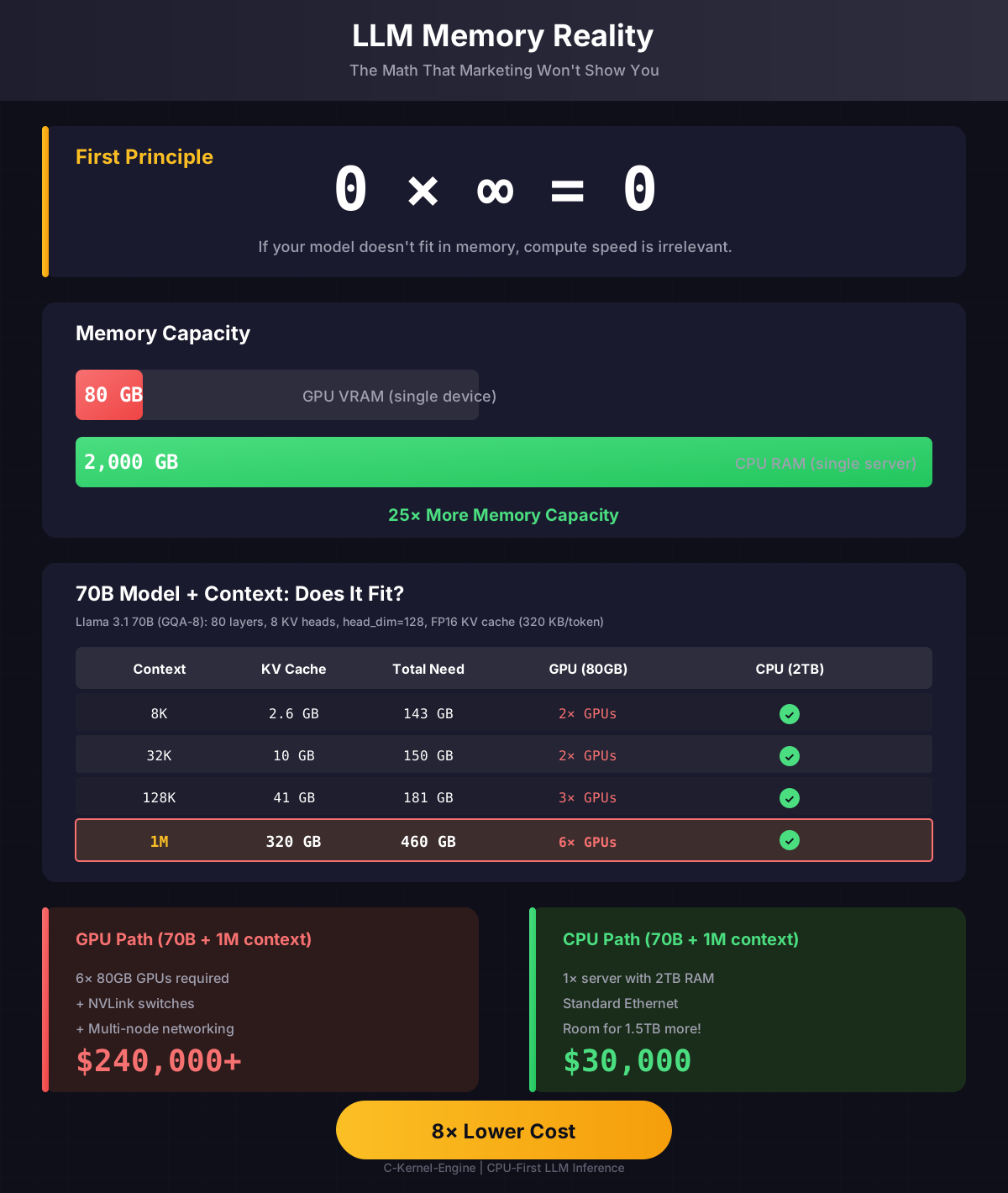
| Context | KV Cache (FP16) | + Model (140GB) | Fits 80GB GPU? | Fits 2TB Server? |
|---|---|---|---|---|
| 8K | 2.6 GB | 143 GB | No (need 2×) | Yes |
| 32K | 10 GB | 150 GB | No (need 2×) | Yes |
| 128K | 41 GB | 181 GB | No (need 3×) | Yes |
| 1M | 320 GB | 460 GB | No (need 6×) | Yes |
📐 Show the Math: How We Calculated This
Model Architecture (70B Dense Model)
| Parameter | Value | Explanation |
|---|---|---|
n_layers | 80 | Number of transformer layers |
n_attention_heads | 64 | Query heads per layer |
n_kv_heads | 8 | KV heads (GQA: 8 groups, each serves 8 Q heads) |
hidden_dim | 8192 | Model hidden dimension |
head_dim | 128 | = hidden_dim / n_attention_heads = 8192/64 |
Step 1: KV Cache Per Token
// FP16 = 2 bytes per element
KV_per_token = 2 × n_layers × n_kv_heads × head_dim × bytes
             = 2 × 80 × 8 × 128 × 2
             = 327,680 bytes
             = 320 KB per token
Step 2: Scale by Context Length
| Context | Calculation | KV Cache |
|---|---|---|
| 8K | 8,192 × 320 KB |
2.62 GB |
| 32K | 32,768 × 320 KB |
10.5 GB |
| 128K | 131,072 × 320 KB |
41.9 GB |
| 1M | 1,048,576 × 320 KB |
335 GB |
Step 3: Add Model Weights
Model weights (70B params × 2 bytes FP16) = 140 GB

Total Memory = Model Weights + KV Cache
  8K context:   140 + 2.6  = 143 GB  → need 2× 80GB GPUs
  32K context:  140 + 10.5 = 150 GB  → need 2× 80GB GPUs
  128K context: 140 + 42   = 182 GB  → need 3× 80GB GPUs
  1M context:   140 + 335  = 475 GB  → need 6× 80GB GPUs
Why GQA Matters
Grouped Query Attention (GQA) reduces KV cache by sharing KV heads across Q heads:
| Attention Type | KV Heads | KV per Token | 128K KV Cache |
|---|---|---|---|
| Multi-Head (MHA) | 64 | 2.56 MB | 335 GB |
| Grouped Query (GQA-8) | 8 | 320 KB | 42 GB |
| Multi-Query (MQA) | 1 | 40 KB | 5.2 GB |
GQA-8 gives 8× memory savings over MHA with minimal quality loss.
70B model + 1M context needs ~475 GB. That's 6× 80GB GPUs ($240K+) vs one 2TB CPU server ($30K). This isn't about FLOPS - it's about where the data can physically exist.
Prefill Memory Scaling
Prefill (processing the input prompt) requires storing activations for ALL tokens simultaneously:
| Prefill Length | Activation Memory | + KV Cache |
|---|---|---|
| 256 tokens | ~400 MB | ~6 MB |
| 1K tokens | ~1.5 GB | ~24 MB |
| 4K tokens | ~6 GB | ~96 MB |
| 16K tokens | ~24 GB | ~384 MB |
Prefill is compute-bound but still needs memory for activations. Long prompts can exceed GPU VRAM.
Visual Guide
Memory Reality Infographic
GPU vs CPU memory comparison for LLM inference:
Click to view full size
Training Advantages: Where CPUs Dominate
Critical Training Scenarios
CPU-only architecture solves training problems that GPU-only simply can't handle.
1. Long Context Training: KV Cache Explosion
The Problem: Long context windows create quadratic KV cache growth
- 4K context: ~32GB KV cache
- 32K context: ~256GB KV cache
- 128K context: ~4TB KV cache
- 1M context: ~128TB KV cache
CPU Advantage:
- 4-16TB RAM: Fits massive KV caches
- No transfer bottleneck: Everything in memory
- GPU Reality: KV cache doesn't fit = can't train
2. Massive Batch Training
The Need: Large batch sizes improve convergence and throughput
- Standard batch: 32-128 samples
- Large batch: 512-2048 samples
- Massive batch: 8192+ samples
- Enterprise batch: 100K+ samples
CPU Scaling Strategy:
- 32 CPUs: 32 batches in parallel
- Each batch: 1-10TB RAM available
- Total effective batch: 32x larger
- No communication overhead: Each CPU independent
The Training Reality Check
GPU Training Limits
- ❌ KV cache fits → max context ~32K
- ❌ Batch size limited by VRAM
- ❌ Large batches require model parallelism
- ❌ Complex coordination across GPUs
- ❌ Expensive hardware (NVLink required)
CPU Training Advantages
- ✅ KV cache fits → context up to 1M+
- ✅ Batch size scales with CPUs
- ✅ Data parallelism = simple scaling
- ✅ RDMA for necessary communication
- ✅ Commodity hardware (Ethernet)
Real-world training needs long context (RAG, document analysis) and large batches (throughput, convergence). CPU-only architecture handles both naturally. GPU-only hits walls that require expensive workarounds.
Distributed Architecture
RDMA-Connected CPU Cluster
┌─────────────────────────────────────────────────────────────────┐
│                     RDMA Fabric (100Gbps+)                      │
├─────────────────┬─────────────────┬─────────────────────────────┤
│                 │                 │                             │
▼                 ▼                 ▼                             │
┌─────────┐   ┌─────────┐   ┌─────────┐                          │
│ Node 0  │   │ Node 1  │   │ Node 2  │  ...  Node N             │
│ 128 cores│   │ 128 cores│   │ 128 cores│                        │
│ 2TB RAM │   │ 2TB RAM │   │ 2TB RAM │                          │
│         │   │         │   │         │                          │
│ Layers  │   │ Layers  │   │ Layers  │                          │
│ 0-15    │   │ 16-31   │   │ 32-47   │                          │
└─────────┘   └─────────┘   └─────────┘                          │
Parallelism Strategies
1. Pipeline Parallelism
Different layers on different nodes. Activations flow through the pipeline.
Node 0: Layers 0-15   →  activations  →  Node 1: Layers 16-31  →  ...
        (forward)           (RDMA)              (forward)
Communication: Send activations between pipeline stages via RDMA.
2. Tensor Parallelism
Large matrices split across nodes. Each node computes a shard.
// 16384 x 16384 weight matrix split across 4 nodes
Node 0: W[0:4096, :]      // Shard 0
Node 1: W[4096:8192, :]   // Shard 1
Node 2: W[8192:12288, :]  // Shard 2
Node 3: W[12288:16384, :] // Shard 3

// After local GEMM, all-reduce to combine
Communication: RDMA all-reduce after each sharded operation.
3. Data Parallelism
Same model replicated. Different batches. Gradient averaging.
Node 0: Model copy, Batch 0  →  gradients  ─┐
Node 1: Model copy, Batch 1  →  gradients  ─┼→  All-reduce  →  Update all
Node 2: Model copy, Batch 2  →  gradients  ─┤
Node 3: Model copy, Batch 3  →  gradients  ─┘
RDMA: The Key Enabler
Why RDMA?
Remote Direct Memory Access - Zero-copy, kernel-bypass networking.
| Metric | TCP/IP | RDMA |
|---|---|---|
| Latency | ~50-100 μs | ~1-2 μs |
| Bandwidth | 10-25 Gbps | 100-400 Gbps |
| CPU overhead | High (kernel, copies) | Near zero |
| Memory copies | Multiple | Zero (DMA) |
RDMA Primitives We Need
// One-sided operations (no remote CPU involvement)
rdma_write(remote_addr, local_buf, size);  // Write to remote memory
rdma_read(local_buf, remote_addr, size);   // Read from remote memory

// Collective operations (built on one-sided)
rdma_allreduce(buf, size, SUM);  // Gradient averaging
rdma_broadcast(buf, size, root); // Weight distribution
rdma_barrier();                   // Synchronization
Implementation Roadmap
| Phase | Feature | Status |
|---|---|---|
| 1 | Single-node training (current) | Done |
| 2 | Multi-core parallelism (OpenMP) | Done |
| 3 | RDMA communication primitives | Planned |
| 4 | Pipeline parallelism | Planned |
| 5 | Tensor parallelism (sharded GEMM) | Planned |
| 6 | Encoder + cross-attention | Planned |
| 7 | 600B+ training | Future |
The Math Doesn't Change
From Tiny to Massive: Same Operations
Forward pass (any size model):
1. embed_tokens()           // Lookup: tokens → vectors
2. for each layer:
   a. rmsnorm()             // Normalize
   b. linear() × 3          // Q, K, V projections
   c. rope()                // Rotary embeddings
   d. attention()           // Softmax(QK^T)V
   e. linear()              // Output projection
   f. residual_add()        // Skip connection
   g. rmsnorm()             // Normalize
   h. mlp_swiglu()          // FFN with gating
   i. residual_add()        // Skip connection
3. rmsnorm()                // Final norm
4. lm_head()                // Logits

Backward pass: Same operations in reverse.
SGD: weights -= lr * gradients

That's it. For any model size.
Hardware Recommendations
For Different Scales
| Model Size | Recommended Setup |
|---|---|
| < 7B | Single server, 32+ cores, 128GB+ RAM |
| 7B - 70B | Single server, 128 cores, 512GB-2TB RAM |
| 70B - 200B | 2-4 nodes, RDMA interconnect, 2TB RAM each |
| 200B - 600B | 8-16 nodes, 100Gbps+ RDMA fabric |
| 600B+ | 32+ nodes, 400Gbps RDMA, pipeline + tensor parallel |
Recommended CPUs by Instruction Set
- AMD EPYC 9004/9005 (Genoa/Turin) - Up to 192 cores, AVX-512 (512-bit), 12-channel DDR5
- Intel Xeon Sapphire Rapids/Granite Rapids - Up to 128 cores, AVX-512 + AMX (512-bit tile)
- Ampere Altra Max - 128 ARM cores, NEON (128-bit), good perf/watt
- AWS Graviton3/4 - Cost-effective ARM, NEON + SVE2
Minimum requirement: AVX (256-bit) or NEON (128-bit). For best performance, AVX-512 or AMX.
RDMA Options
- Mellanox/NVIDIA ConnectX-7 - 400Gbps InfiniBand
- Intel E810 - 100Gbps RoCE (RDMA over Ethernet)
- AWS EFA - Cloud RDMA for EC2 instances
Why Not GPU?
"Nvidia, f**k you."
— Linus Torvalds, 2012 (video source) regarding their closed-source Linux drivers
Beyond the open-source concerns:
- Cost - Compare current complete-system purchase, power, cooling, networking, utilization, and support costs for the actual workload
- Memory - 80GB VRAM vs 2TB+ system RAM
- Availability - Export-controlled, supply constrained vs commodity CPUs
- Flexibility - Run anywhere: cloud, on-prem, edge, embedded
- Debugging - printf works. GDB works. Valgrind works.
- Longevity - C code compiles forever. CUDA versions break.
Further Reading
- Memory Reality - What NVIDIA marketing won't tell you about LLM memory
- Memory Tetris - Research design: DRAM as a tensor cache over NVMe (not implemented)
- Developer Guide - How the engine works
- Memory Safety - Bump allocator design
- Profiling Guide - Performance optimization