Memory Reality: What NVIDIA Marketing Won't Tell You
The Hidden Truth About LLM Memory
GPU marketing focuses on FLOPS. Real-world LLM inference is dominated by memory bandwidth and capacity. This page shows the actual numbers.
GPU marketing focuses on FLOPS. Real-world LLM inference is dominated by memory bandwidth and capacity. This page shows the actual numbers.
Part 1: Activation Memory Per Token
Memory Writes Per Token (Decode)
For Qwen2-0.5B (hidden_dim=896, intermediate=4864, 24 layers):
| Operation | Writes per Layer | 24 Layers Total |
|---|---|---|
| RMSNorm output | 896 × 4 = 3.5 KB | 84 KB |
| Q, K, V projections | 3 × 896 × 4 = 10.5 KB | 252 KB |
| Attention output | 896 × 4 = 3.5 KB | 84 KB |
| O projection | 896 × 4 = 3.5 KB | 84 KB |
| MLP gate + up | 2 × 4864 × 4 = 38 KB | 912 KB |
| MLP down | 896 × 4 = 3.5 KB | 84 KB |
| KV cache (new token) | ~1 KB | 24 KB |
| Final logits (once) | - | ~600 KB |
| Total per token | ~63 KB | ~2.1 MB |
Key Insight
Decode is memory-bandwidth bound. Every token requires ~2 MB of memory traffic through activations alone, plus reading all model weights (~500MB for Qwen2-0.5B).
Decode is memory-bandwidth bound. Every token requires ~2 MB of memory traffic through activations alone, plus reading all model weights (~500MB for Qwen2-0.5B).
Part 2: Context Length - The Memory Multiplier
The Elephant in the Room
Context length is the biggest memory factor that GPU marketing ignores. KV cache grows linearly with context, and it must stay resident for the entire generation.
Context length is the biggest memory factor that GPU marketing ignores. KV cache grows linearly with context, and it must stay resident for the entire generation.
KV Cache Size Formula
KV Cache Size = 2 × n_layers × n_kv_heads × head_dim × context_length × bytes_per_element

For Qwen2-0.5B (FP32 KV cache):
  = 2 × 24 × 2 × 64 × context_length × 4 bytes
  = 24,576 × context_length bytes
  = 24 KB per token of context

For Qwen2-0.5B (FP16 KV cache):
  = 12 KB per token of context
KV Cache Scaling by Context Length
| Context Length | KV Cache (FP32) | KV Cache (FP16) | Fits in GPU VRAM? | Fits in CPU RAM? |
|---|---|---|---|---|
| 2K tokens | 48 MB | 24 MB | Yes (80GB) | Yes (4TB) |
| 8K tokens | 192 MB | 96 MB | Yes | Yes |
| 32K tokens | 768 MB | 384 MB | Yes | Yes |
| 128K tokens | 3 GB | 1.5 GB | Tight with model | Yes |
| 512K tokens | 12 GB | 6 GB | Leaves little for model | Yes |
| 1M tokens | 24 GB | 12 GB | No room for 70B model | Yes |
The Real Problem: Model + KV Cache Must Fit Together
70B Model (Llama 3.1 70B with GQA-8)
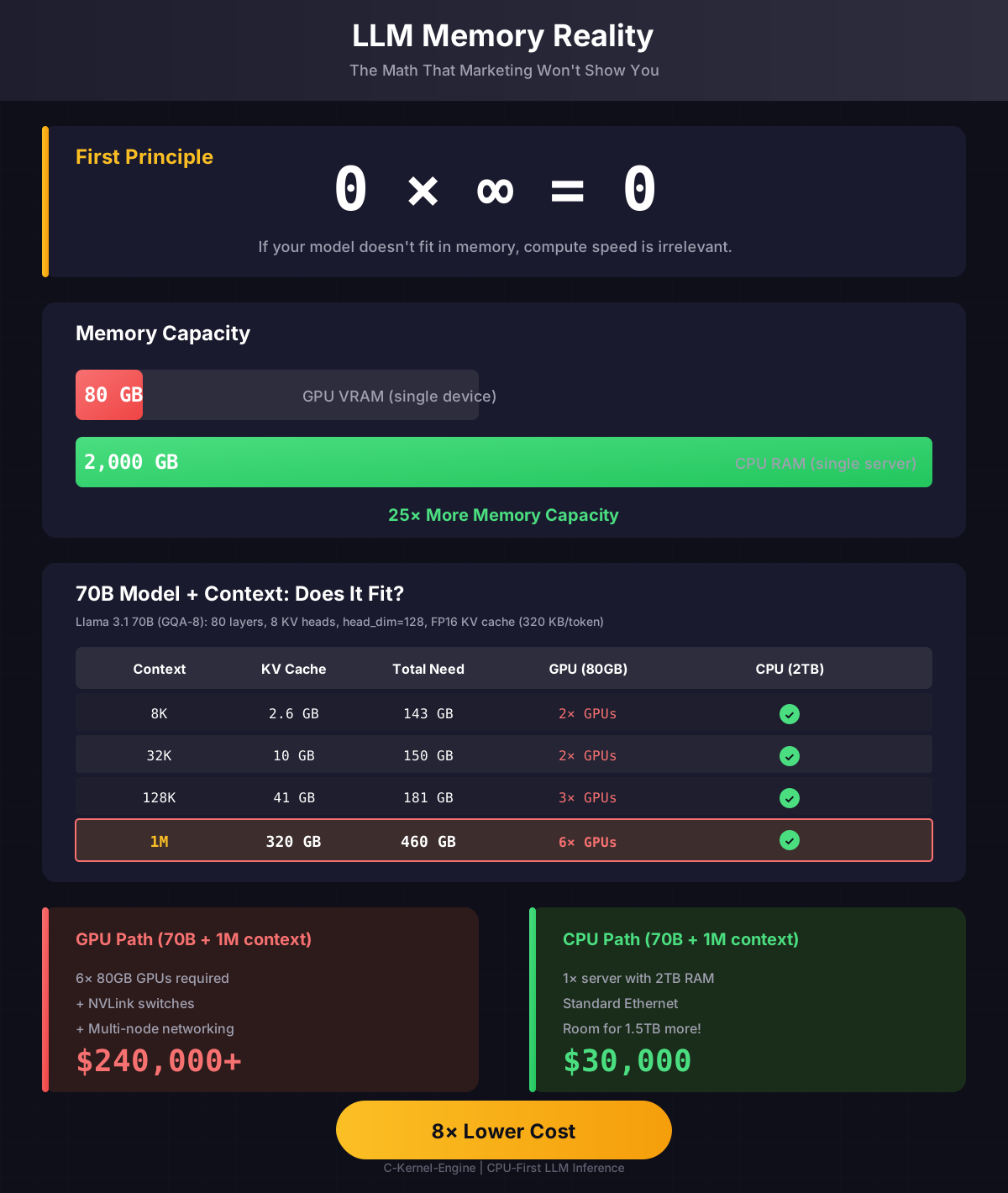
| Context | KV Cache (FP16) | + Model (140GB) | Fits H100 (80GB)? | Fits 2TB Server? |
|---|---|---|---|---|
| 8K | 2.6 GB | 143 GB | No (need 2×) | Yes |
| 32K | 10 GB | 150 GB | No (need 2×) | Yes |
| 128K | 41 GB | 181 GB | No (need 3×) | Yes |
| 1M | 320 GB | 460 GB | No (need 6×) | Yes |
📐 Show the Math: 70B KV Cache Calculation
Llama 3.1 70B Architecture
| Parameter | Value | Explanation |
|---|---|---|
n_layers | 80 | Number of transformer layers |
n_attention_heads | 64 | Query heads per layer |
n_kv_heads | 8 | KV heads (GQA: 8 groups, each serves 8 Q heads) |
hidden_dim | 8192 | Model hidden dimension |
head_dim | 128 | = hidden_dim / n_attention_heads = 8192/64 |
KV Cache Per Token (FP16)
KV_per_token = 2 × n_layers × n_kv_heads × head_dim × bytes
             = 2 × 80 × 8 × 128 × 2
             = 327,680 bytes
             = 320 KB per token
Scale by Context
8K context:   8,192 × 320 KB   = 2.62 GB
32K context:  32,768 × 320 KB  = 10.5 GB
128K context: 131,072 × 320 KB = 41.9 GB
1M context:   1,048,576 × 320 KB = 335 GB
Why GQA Reduces Memory 8×
Without GQA (Multi-Head Attention), 70B would need 64 KV heads instead of 8:
MHA (64 KV heads): 2.56 MB/token → 128K = 335 GB KV cache
GQA (8 KV heads):  320 KB/token  → 128K = 42 GB KV cache
                                          8× smaller!
KV Cache for Different Model Sizes
| Model | Parameters | KV per Token (FP16) | 128K Context KV | 1M Context KV |
|---|---|---|---|---|
| Qwen2-0.5B | 0.5B | 12 KB | 1.5 GB | 12 GB |
| Llama-3-8B | 8B | 64 KB | 8 GB | 64 GB |
| Llama-3-70B | 70B | 320 KB | 40 GB | 320 GB |
| Llama-3-405B | 405B | 1.2 MB | 150 GB | 1.2 TB |
The 405B Reality
Llama-3-405B with 1M context needs 1.2 TB just for KV cache. That's 15× the capacity of an H100. No amount of NVLink can solve this - you need actual memory, which CPUs have.
Llama-3-405B with 1M context needs 1.2 TB just for KV cache. That's 15× the capacity of an H100. No amount of NVLink can solve this - you need actual memory, which CPUs have.
Part 3: Prefill vs Decode Memory Patterns
Decode (1 token at a time)
Memory pattern: Bandwidth-bound
- Read: All model weights (~1GB for 0.5B model)
- Read: Entire KV cache (grows with context)
- Write: 1 new K, 1 new V per layer
- Write: 1 output token logits
Bottleneck: Memory bandwidth, not compute
Prefill (N tokens at once)
Memory pattern: Compute + bandwidth
- Read: All model weights (same as decode)
- Write: N × K, N × V per layer to cache
- Intermediate: N × hidden_dim per operation
- Scales with N (context length)
Bottleneck: Both compute and memory
Prefill Activation Memory (Qwen2-0.5B)
| Prefill Length | Activation Memory | + KV Cache |
|---|---|---|
| 256 tokens | ~400 MB | ~6 MB |
| 1K tokens | ~1.5 GB | ~24 MB |
| 4K tokens | ~6 GB | ~96 MB |
| 16K tokens | ~24 GB | ~384 MB |
Prefill vs Decode
Prefill processes all input tokens at once (compute-bound). Decode generates tokens one at a time (memory-bound). Long prompts can exceed GPU VRAM even when the model fits.
Prefill processes all input tokens at once (compute-bound). Decode generates tokens one at a time (memory-bound). Long prompts can exceed GPU VRAM even when the model fits.
Part 4: Why FP16 KV Cache Matters for CPUs
FP16 KV Cache: Not About Bandwidth, About L3 Residency
The common misconception: "FP16 saves memory bandwidth."
The reality: FP16 doubles context that fits in L3 cache.
| L3 Cache Size | Max Context (FP32 KV) | Max Context (FP16 KV) | Benefit |
|---|---|---|---|
| 6 MB (laptop) | ~6K tokens | ~12K tokens | 2× more "hot" context |
| 32 MB (desktop) | ~32K tokens | ~64K tokens | 2× more "hot" context |
| 128 MB (server) | ~128K tokens | ~256K tokens | 2× more "hot" context |
| 384 MB (EPYC) | ~384K tokens | ~768K tokens | 2× more "hot" context |
The L3 Cache Insight
When KV cache fits in L3 (~100 GB/s bandwidth), decode is fast. When it spills to DRAM (~20-50 GB/s), decode slows 2-5×. FP16 keeps more context in L3, maintaining fast decode for longer contexts.
When KV cache fits in L3 (~100 GB/s bandwidth), decode is fast. When it spills to DRAM (~20-50 GB/s), decode slows 2-5×. FP16 keeps more context in L3, maintaining fast decode for longer contexts.
Part 6: The Complete Picture
Memory Requirements: Model + KV Cache + Activations
Total Memory = Model Weights + KV Cache + Activation Memory

For 70B model at 128K context (FP16 weights, FP16 KV):
  Model:       140 GB
  KV Cache:     40 GB
  Activations:  10 GB
  ──────────────────
  Total:       190 GB

GPU (H100 80GB):  DOESN'T FIT
GPU (3× H100):    Fits, but $120K+ and NVLink complexity

CPU (2TB server): FITS with 1.8TB headroom
                  Run 10× concurrent users!
                  $30K total cost
GPU Memory Crisis Points
- 7B + 32K context: Tight on 24GB consumer GPU
- 13B + 32K context: Needs 40GB+ GPU
- 70B + 8K context: Needs 2× 80GB GPUs
- 70B + 128K context: Needs 3× 80GB GPUs
- 405B + any context: Needs 8+ GPUs minimum
Pattern: Every model × context combination hits a wall.
CPU Memory Advantages
- Capacity: 2-4 TB per server
- Cost: ~$10/GB vs ~$500/GB for HBM
- No walls: Just add more RAM
- Multi-model: Run many models in same RAM
- Long context: 1M+ tokens? No problem.
Pattern: Memory scales with need, not with GPU count.
Summary: The Numbers Don't Lie
What NVIDIA Marketing Says vs Reality
| Claim | Marketing | Reality |
|---|---|---|
| "GPUs are faster" | Higher FLOPS | LLM inference is memory-bound, not compute-bound |
| "80GB is enough" | Fits 40B model | 70B + long context needs 200GB+ |
| "Just add more GPUs" | Scale with NVLink | $40K per GPU, max 8 per node, then Ethernet anyway |
| "HBM is fast" | 3.3 TB/s bandwidth | Irrelevant when model doesn't fit (0 × ∞ = 0) |
| "Enterprise ready" | DGX systems | $500K+, still limited by VRAM per model |
The Bottom Line
Real LLM deployment needs: large models + long context + multiple concurrent users. CPUs provide 10-100× more memory at 10× lower cost. The math is simple: 0 × ∞ = 0. If it doesn't fit, FLOPS don't matter.
Real LLM deployment needs: large models + long context + multiple concurrent users. CPUs provide 10-100× more memory at 10× lower cost. The math is simple: 0 × ∞ = 0. If it doesn't fit, FLOPS don't matter.
Visual Guides
Memory Reality Infographic
GPU vs CPU memory comparison for LLM inference:
Click to view full size
Further Reading
- Scaling Philosophy - The two first principles
- Memory Tetris - Research design: DRAM as a tensor cache over NVMe (not implemented)
- Developer Guide - How C-Kernel-Engine works
- Profiling Guide - Measure your actual performance